RRB NTPC · ಪ್ರಶ್ನೆ 81
ಒಂದು ಫೈಲ್ ಹೆಸರು ಹೈಲೈಟ್ ಆಗಿದ್ದರೆ, ಮತ್ತು ನೀವು ಅದನ್ನು ಮೂಲ ಫೋಲ್ಡರ್ನಲ್ಲಿ ಇಟ್ಟುಕೊಂಡು ಇನ್ನೊಂದು ಫೋಲ್ಡರ್ಗೆ ನಕಲಿಸಲು ಬಯಸುತ್ತೀರಿ. ಈ ಕಾರ್ಯಕ್ಕೆ ಯಾವ ಹಂತಗಳು ಹೊಂದಾಣಿಕೆಯಾಗುತ್ತವೆ?
ಉತ್ತರ ತೋರಿಸು ಮತ್ತು ವಿವರಣೆವಿವರಣೆ ನೋಡಿ
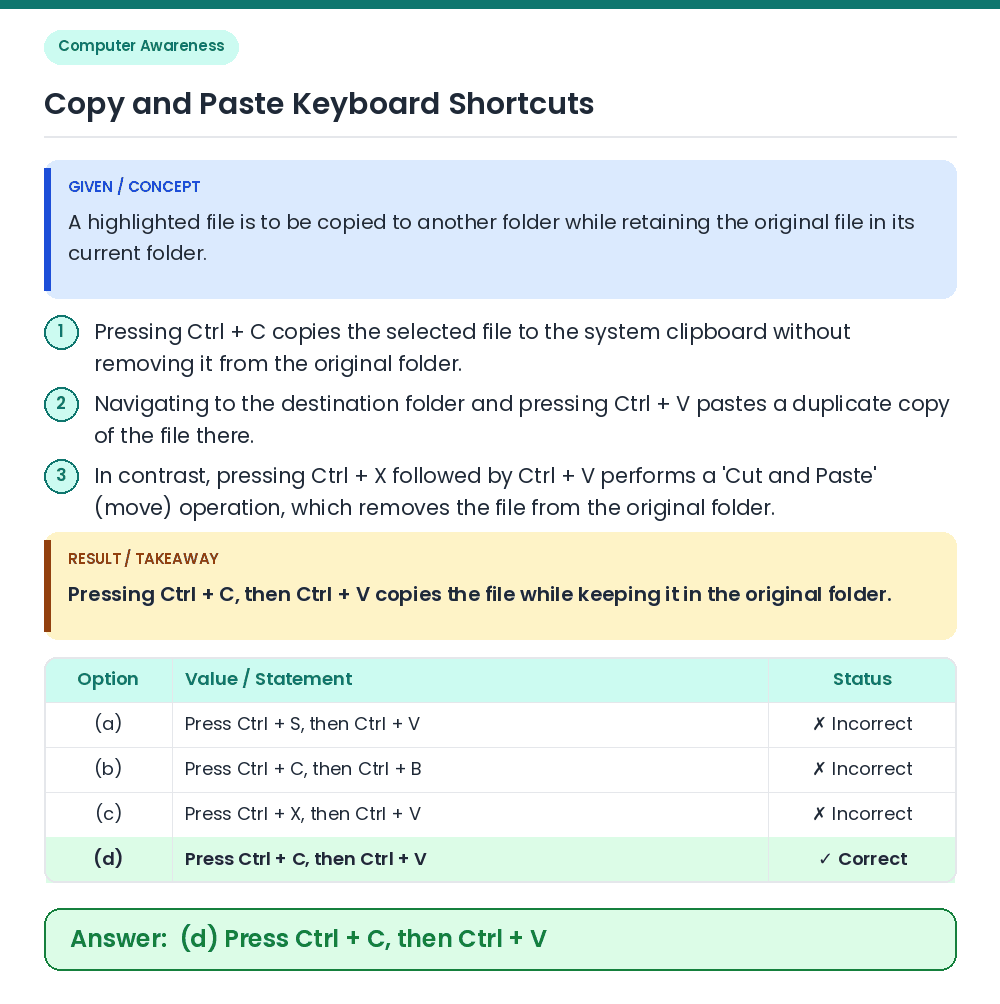
ಉತ್ತರ: (D) Ctrl + C, ನಂತರ Ctrl + V ಒತ್ತಿರಿ
• A highlighted file is to be copied to another folder while retaining the original file in its current folder. • Pressing Ctrl + C, then Ctrl + V copies the file while keeping it in the original folder. Related Facts: • Pressing Ctrl + C copies the selected file to the system clipboard without removing it from the original folder. • Navigating to the destination folder and pressing Ctrl + V pastes a duplicate copy of the file there. • In contrast, pressing Ctrl + X followed by Ctrl + V performs a 'Cut and Paste' (move) operation, which removes the file from the original folder. Correct Answer: (d) Press Ctrl + C, then Ctrl + V